A prompt hopes. A direction specifies.
Use this stack every time: Ultra realistic vertical [genre] photo of [subject + action]. Then wardrobe / props / anatomy cues. Then environment.
Then lighting + mood + film grain + no HDR. If a line could apply to any other image, delete it.
Write your direction on the skeleton and fill the brackets before you hit generate.
The model will invent cartoon, CGI, plastic skin, bad anatomy, text and watermarks unless you forbid them. Every direction ends with Neg: plus the list.
Face close-ups add beauty filter, plastic skin. Animals in rooms add toy.
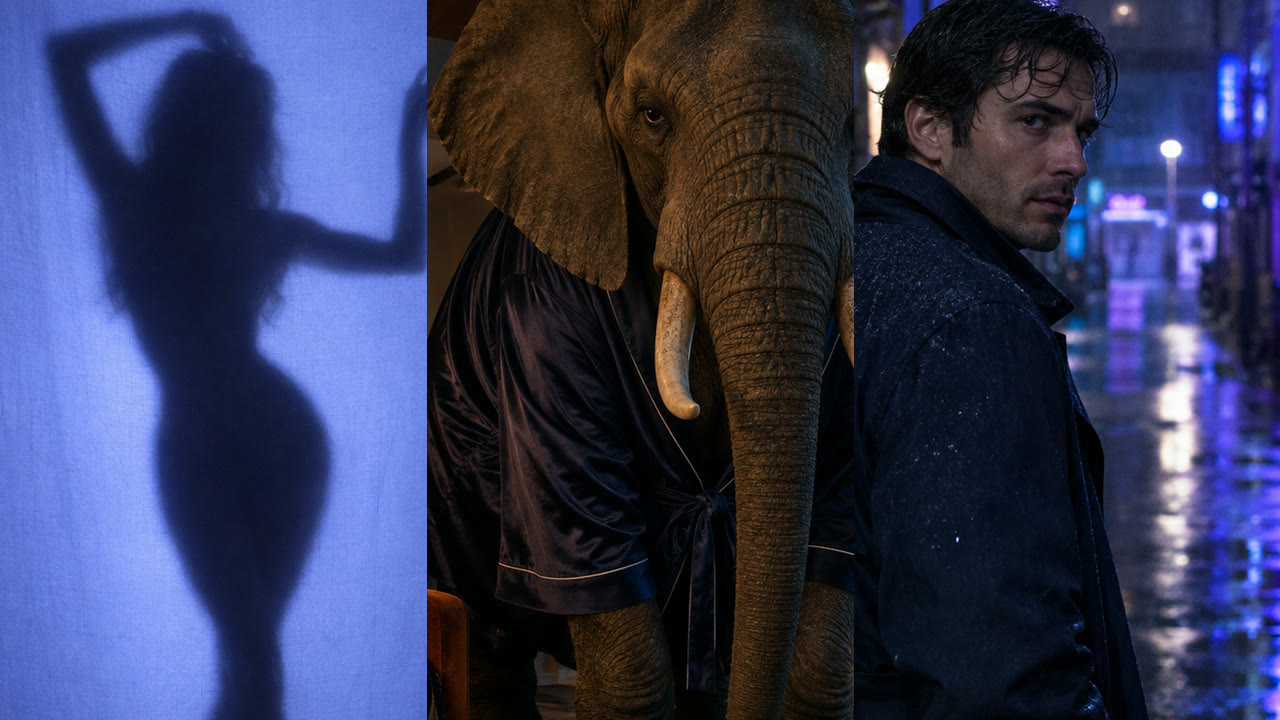
Architecture adds over HDR. Silhouettes add clear face.
Do not skip this line, it is half the direction.
The eight directions in the pack are not a moodboard. They are a grammar.
Take prompt 6 (navy trench, rain alley) and swap the subject for your product or person. Keep vertical, keep film grain, keep the negative list.
One structure, new subject, still directed. Do not rewrite from scratch, duplicate, then replace only the bracketed bits.
If you will post this as a carousel or reel, leave the face clean. Prompt 2 is the overlay-safe pattern: silhouette, no face, black shadow only.
Prompt 8 is a beauty close-up, if you use it, put type in the margin, never on the cheek or eyes. QC rule: if type sits on a face, the frame fails.
Direct the crop so there is a quiet zone for the hook.
Pick three from the pack: one silhouette (2), one editorial full-body (5 or 6), one still life or space (7 or 9). Each one goes into your image model as written.
Do not add "cinematic, 8k, masterpiece". Generate, pick one keeper per prompt, export 4:5.
That is a directed set, not a folder of almosts. The full pack is in the members pack below.
This guide is the full process. The ready-made version lives inside AI Creative OS on Skool, next to every other prompt pack I post.